Claude 防封方案
担心 Claude 账号风控?先把本机网络与浏览器环境理清。
面向中国用户及其他跨区域使用场景:排查浏览器资料混用、意外直连和 DNS / WebRTC 暴露问题。把链接交给 Agent,在你有权使用的网络与服务范围内完成配置和验收。
交给有本地文件与命令执行权限的 AI Agent。你决定授权范围并处理登录,环境检查、配置适配和验收交给 Agent。
Windows 实测有效范围:本机案例中的专用浏览器、外部链接分流、IPv4 直连阻断与代理故障保护。未验证降低封号率或避开平台检测;不提供地区资格绕过。
登录状态下,先做本地只读检查
新增完整 WFP 规则核验与错误端口对照测试,不启动或停止 Claude,不自动访问外部检测站。账号资料和实际代理配置只保留在本机。
浏览器环境辅助检测
用途:辅助查看当前浏览器的出口 IP、DNS、WebRTC 和设备信息,对比配置前后的观察结果。请将链接交给 Agent 在专用浏览器中打开;这里点击只会在当前浏览器新建标签,不会自动切换到专用 Edge。
非 Claude 官方检测,页面评分不等于 Claude 内部风控结论,也不是防封证明。访问会向第三方站点及其检测服务暴露当前出口 IP 和可读取的浏览器信息;本站不嵌入、不自动运行检测。不要提交账号密码、令牌或公开含 IP 的截图。检测结果不能替代代理断开和真实流量验收。
只改需要改的入口
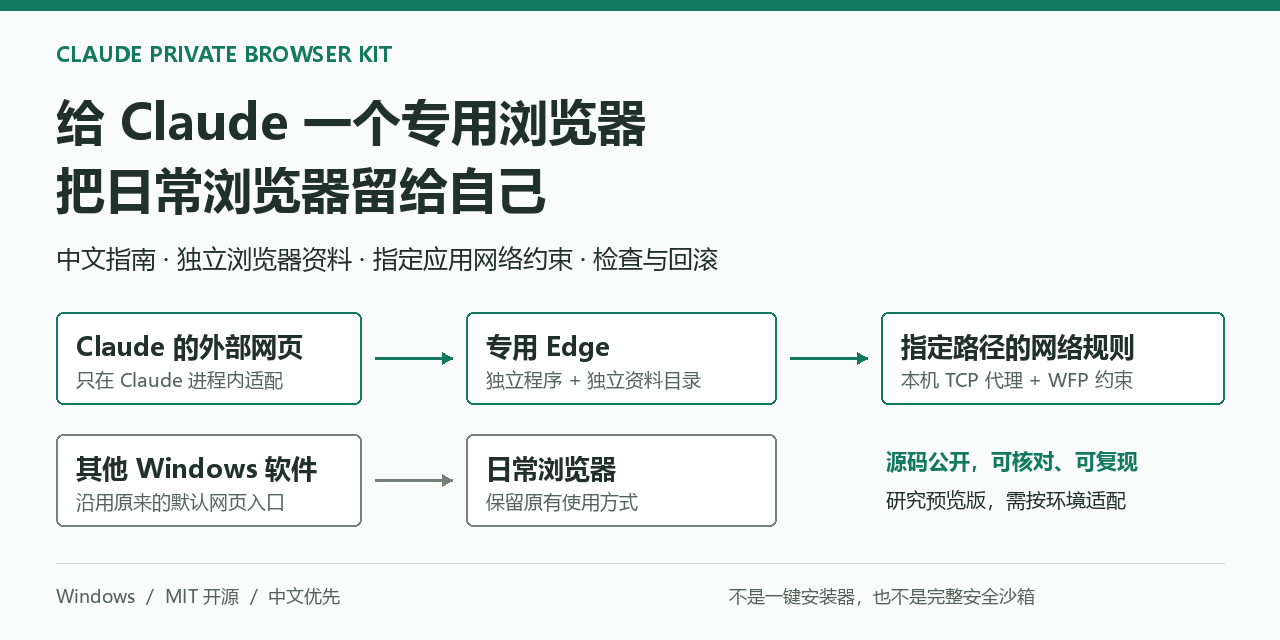
外部网页,进入专用 Edge
进程内适配 Claude 打开的网页,日常软件保留原来的浏览器入口。
浏览器资料分开
独立程序与独立资料目录,不导入日常浏览器的 Cookie、密码或历史。
先检查,再部署
从只读检查开始,结合真实网络验收;明确改了什么,以及如何回滚。
Agent 从只读检查开始
git clone https://github.com/jiusi1-cpu/claude-private-browser-kit.git
cd claude-private-browser-kit
npm test
npm run check:release
node scripts/audit.cjs --config examples/audit.example.json
示例审计的预期结果:UNVERIFIED · 退出码 2
按问题找资料
先说清边界
配好了 MCP,为什么登录页还开在别的浏览器?
MCP 启动浏览器与桌面端打开外部网页是两条路径,需要分别适配和验收。现有证据没有证明登录后的真实 Claude 模型驱动 MCP 全链路通过。
能保证固定 IP、家宽或者不封号吗?
不能。出口性质与稳定性取决于你有权使用的上游服务,需要实际测量。本项目不提供账号或代理节点,不承诺隐藏所有地区信号。
适合完全没有技术基础的用户吗?
可以把配置工作交给有本机权限的 Agent,无需自己照着命令操作。你仍负责授权和登录。Agent 必须按版本适配并验收;全新机器完整部署尚未验证,不能承诺所有环境自动成功。
Claude Account Risk Toolkit
Concerned about Claude account restrictions? Start with your local environment.
For users in China and other cross-region setups concerned about account restrictions: audit mixed browser profiles, unintended direct traffic, and DNS / WebRTC exposure. Let a local AI agent configure and verify controls within your authorized access.
Use an AI agent with local file and command access. You control authorization and login; the agent handles inspection, adaptation and verification.
Tested on Windows in one local case: dedicated browser routing, IPv4 direct-traffic blocking and proxy-failure protection. Reduced ban rates and detection avoidance are unproven. This does not establish regional eligibility.
Read-only checks while signed in
Inspect complete WFP predicates without starting Claude, changing filters or calling an external checker. Account data and live configuration stay local.
Supplementary browser environment check
Open Net.Coffee checker (third party)
Use it to inspect the current browser's egress IP, DNS, WebRTC and device information, and compare observations before and after configuration. Ask your agent to open the link in the dedicated browser. This link opens a new tab in your current browser; it does not launch private Edge.
Not an official Claude test. Its score is not Claude's internal risk assessment or proof against bans. Visiting exposes your egress IP and readable browser information to the third-party site and its test services. This site neither embeds nor runs the test automatically. Never submit passwords or tokens, or publish screenshots containing your IP. It does not replace proxy-outage and live-traffic verification.
Scope the change
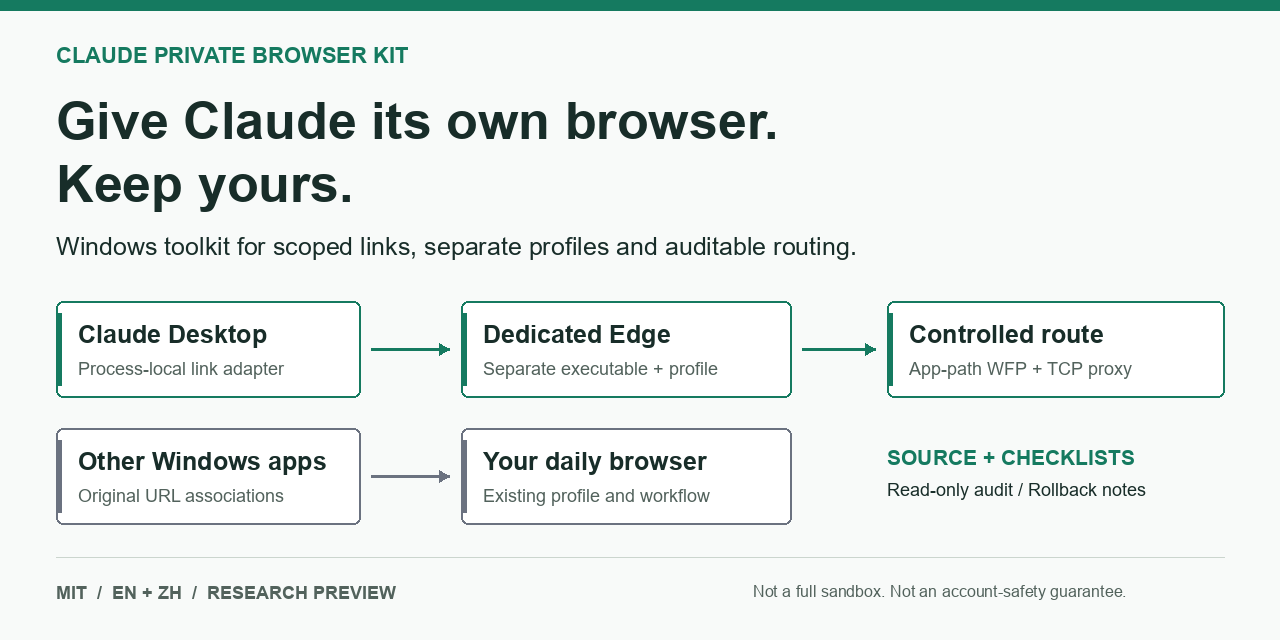
A dedicated external-link route
A process-local adapter routes Claude's web links to a dedicated Edge, keeping the daily browser entry point unchanged.
Separate browser data
A separate executable and profile, without importing your daily cookies, passwords or browsing history.
Audit before deployment
Start with read-only checks, then test real network behavior. Keep changes inspectable and rollback explicit.
The agent starts with read-only checks
Requires Git and Node.js 22 or newer. No npm dependency installation.
These commands do not change the system proxy, registry or firewall. Example paths return UNVERIFIED, not a passing environment.
Open the verification checklistgit clone https://github.com/jiusi1-cpu/claude-private-browser-kit.git cd claude-private-browser-kit npm test npm run check:release node scripts/audit.cjs --config examples/audit.example.json
Expected example audit: UNVERIFIED · exit code 2
Find the evidence
Know the limits
Why does the login page use a different browser from MCP?
MCP browser startup and desktop external-link handling are separate paths. Each needs its own adaptation and verification. The retained evidence does not establish an authenticated model-driven MCP workflow.
Does this guarantee a stable IP or prevent bans?
No. Exit properties and stability depend on your authorized upstream service and require measurement. This project supplies neither accounts nor proxy nodes, and makes no claim to hide every regional signal.
Is it ready for nontechnical users?
Delegate setup to an agent with local tools, rather than running commands yourself. You still control authorization and login. Version adaptation and verification are required; fresh-machine deployment remains unverified, so automatic success is not promised.